
Your photo is the first frame · Sound in every video · No watermark

Free Animate Photo AI: Make Your Photo Move

Free animate photo AI for the photo you already love: a face blinks and smiles, a painting starts to move, clouds roll over a landscape, and it all comes with sound.

Still your photo, just movingYou choose what movesYou hear it too
Three scenes

Animate Photo AI Examples: a Face, a Painting, a Landscape

These are the three photos people most want to see move. Add your own in the generator above and say in one line what should move, the way each example below does.

Portrait

A portrait that blinks, then smiles at you

One evening portrait photo of a woman leaning on a post. She holds the pose, blinks with her eyes on the lens, and a small smile spreads across her face while a few strands of hair stir. The background never changes, because it is still her photo.
  • Painting

    A painting that starts to pour and shimmer

    A painted fantasy scene of mossy temple ruins under a column of golden light. The light pours down like a waterfall, mist rises where it lands and the pool below shimmers, all in the same brushwork as the original.

  • Landscape

    A landscape that breathes

    A sunset photo of old spires and a still river. The buildings stay put while the storm clouds roll on and their reflections slide across the water, like a time-lapse shot from one spot.

What Free Animate Photo AI Does With One Photo

Animate photo AI turns one photo into a short video that starts on that exact photo. Upload a JPG or PNG, type what should move, and a free run gives you a 4-second video with its own sound and no watermark, for personal use. It runs on the same engine as our free image to video AI: you start with no account, and a free account keeps going with no daily cap.

What it does

You get an MP4 with a start, an end and a sound track, ready for Stories, Reels or a message. For a face saying exact words to the camera, put the line in quotes in your prompt.

Creative engine

One photo in, one moving moment out

The free run is MiniMax H3, the same model behind every example on this page.

1 photo
What you upload
4 s
A free video
With sound
In the same file

It animates, it does not redraw

Animate photo AI keeps the photo you gave it. Faces, outfits and the background stay as they were; only what you ask for moves.

Keep going on a free account

Sign in free and animate the next photo, and the one after it, with no daily cap. Each video lands in your history.

Photo, then video

Animate Photo AI, Before and After

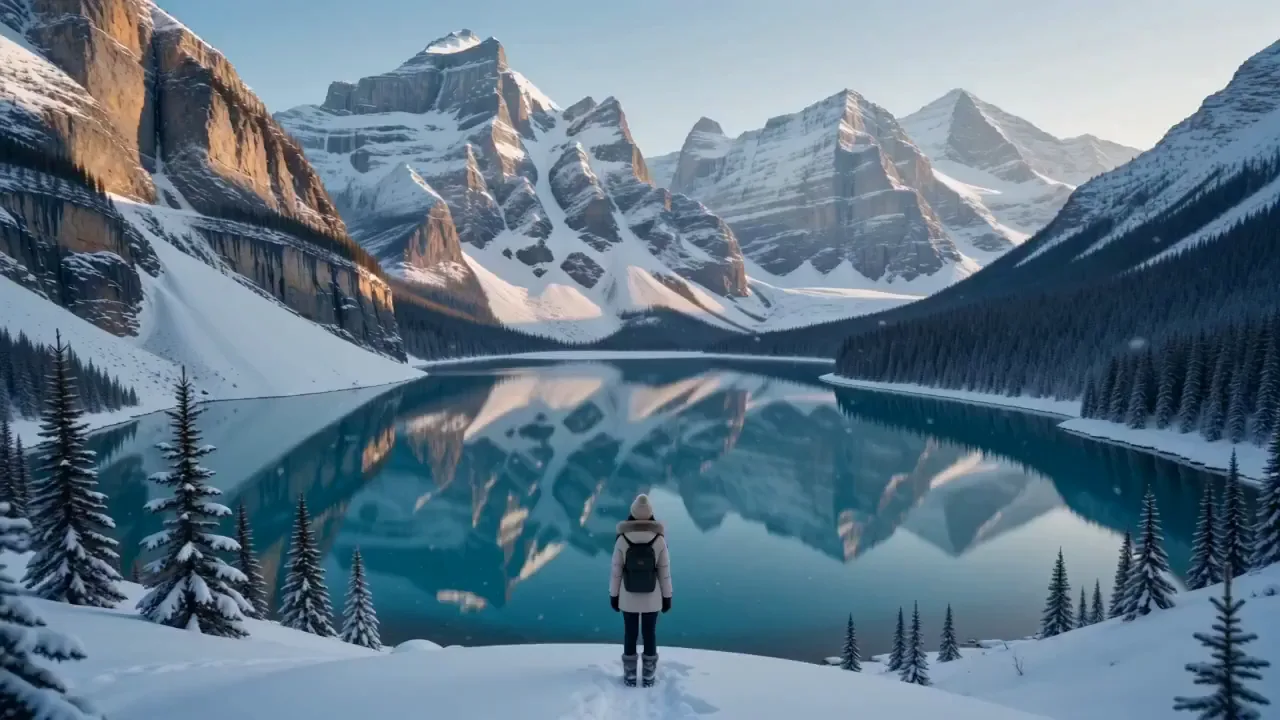
Left is the photo exactly as it was uploaded. Right is what animate photo AI made from it: the camera walks you down to the lake, she turns round and smiles, and snow starts to fall.

The photo: a lake in the snow
The video: she turns and smiles
More to animate

Animate a Photo of a Drawing or Your Dog

Animate photo AI is not only for a portrait photo. Two more photos that came to life from one photo and one line.

  • A drawing of a couple, still in its own style

    A flat illustration of a couple in uniform and a pink hijab. They lean in, smile at each other and the petals around them drift, without a single line of the drawing changing.

  • Your dog, looking around the room

    From one photo, a fluffy dog on a dark stage blinks, turns its head and shifts its paws while spotlights and dancers move behind it. Pets are the photos people send round the family chat first.

Steps

How to Animate a Photo With Animate Photo AI

From the photo on your phone to a video you can send, in three steps.

  1. 01

    Upload one photo

    Any JPG or PNG photo: a portrait, a pet, a photo of a painting, a landscape. One clear subject with a little room around it moves best.

  2. 02

    Say what should move

    Write it in a line: who moves, how, where the camera sits and what we should hear, like 'she blinks and smiles, a light breeze, quiet cafe sound'.

  3. 03

    Make it and download

    Press the button and keep the tab open. The video of your photo starts when the countdown ends, then plays right on the page with its sound, ready to download as an MP4.

Picking the photo

Which Photos Animate Photo AI Brings to Life Best

Animate photo AI works on almost any photo, but a photo with these four things makes the motion look real on the first try.

01

Faces large and toward the camera

A head-and-shoulders portrait gives the blink and the smile the most to work with. A face the size of a fingernail in a group photo moves less convincingly.

02

One subject, a bit of space around it

Hair, fabric and hands need room to move. A photo cropped tight to the chin cuts the motion off at the edge.

03

Something that can move

Sky, water, leaves, hair, a scarf: a landscape photo with clouds or a river animates far better than a bare wall, because there is motion to find.

04

Upright for phones

This page opens on a tall 9:16 frame for Stories and Reels. Switch to wide in the generator for a landscape photo you will show on a TV or a laptop.

Unlimited AI video generator pricing

Unlimited MiniMax H3 on every paid plan, plus fast credits each month for Veo 3.1 and Grok. A failed run is refunded.

Free · A real clip before you pay anything

Nothing to sign, nothing to cancel.

Make my clip free
Unlimited H3

Starter

For people who make a few AI video clips most days.
Tax included
$14.90 / month
Unlimited MiniMax H3Veo and Grok are counted, not unlimited: about 14 Veo 3.1 (8s) · 11 Grok (15s) a month.100 fast credits / month

1×

full-speed H3 a day, vs Starter

1

clips rendering at once

Heaviest days
Never blocked
MiniMax H3

What's included

  • Unlimited MiniMax H3 at 480p or 768p
  • About 14 Veo 3.1 Fast clips a month: 8s 720p with sound
  • 100 fast credits a month for Veo and Grok
Popular

Creator

For creators posting every week.
Tax included
$29 / month
Unlimited MiniMax H3Veo and Grok are counted, not unlimited: about 28 Veo 3.1 (8s) · 22 Grok (15s) a month.200 fast credits / month

2×

full-speed H3 a day, vs Starter

2

clips rendering at once

Heaviest days
Never blocked
MiniMax H3

Everything in Starter, plus

  • About 28 Veo 3.1 Fast clips a month: 8s 720p with sound
  • Twice Starter's full-speed H3 every day
  • Two clips rendering at once

Checkout runs on Stripe. Your card details never reach Free Image to Video.

Pro

For weekly uploads that mix models.
Tax included
$59 / month
Unlimited MiniMax H3Veo and Grok are counted, not unlimited: about 71 Veo 3.1 (8s) · 55 Grok (15s) a month.500 fast credits / month

5×

full-speed H3 a day, vs Starter

3

clips rendering at once

Heaviest days
Never blocked
MiniMax H3

Everything in Creator, plus

  • About 71 Veo 3.1 Fast clips a month: 8s 720p with sound
  • 5× Starter's full-speed H3 every day
  • Three clips rendering at once
Best value

Studio

For teams and daily-upload channels.
Tax included
$119 / month
Unlimited MiniMax H3Veo and Grok are counted, not unlimited: about 142 Veo 3.1 (8s) · 111 Grok (15s) a month.1,000 fast credits / month

10×

full-speed H3 a day, vs Starter

5

clips rendering at once

Heaviest days
Never blocked
MiniMax H3

Everything in Pro, plus

  • About 142 Veo 3.1 Fast clips a month: 8s 720p with sound
  • 10× Starter's full-speed H3 every day
  • Five clips rendering at once

Cancel from Settings → Billing whenever you like; your plan keeps running until the end of the period you already paid for. Who runs Free Image to Video, every model on the shelf and how to reach us are on the about page.

Answers

Animate Photo AI: Questions

Yes, this one. Upload a photo and it starts with no account and no card. A free account keeps going with no daily cap: each video is 4 seconds at 480p on MiniMax H3, with sound and no watermark, for personal use.

Yes. It starts a few minutes after you press the button, and a countdown shows when. To keep going, sign in with a free account; your first one there each day starts straight away.

It is built not to. Your photo is the first frame and the prompt asks it to keep the face, colours and framing, so the person still looks like themselves. A large, sharp face toward the camera holds best; a tiny face in a crowd can drift.

Yes. Take a photo of the artwork straight on, or scan it, and say what should move: the water in it, the clouds, a figure turning. Ask it to keep the brushwork and colours, as the painting example above does, and the art style stays.

Yes. Name what moves and what stays: 'the clouds roll, the river reflects them, the buildings do not move, camera still'. That is how the storm-over-the-river example was made.

No. You get an MP4 video with sound that starts on your photo and ends a few seconds later. It plays anywhere a video does: Stories, Reels, TikTok, a message.

A free video is 4 seconds at 480p. On a plan, MiniMax H3 makes up to 15 seconds at 768p, and Grok Imagine Video 1.5 and Veo 3.1 Fast are in the same model menu.

Free videos are for personal use. Any paid plan covers commercial use, so the same video can go in an ad, on a product page or on a monetised channel.

Animate Photo AI on the Photo You Keep Coming Back To

Pick the photo you look at most, the face, the pet, the place, and watch that photo move with its own sound. No account needed to start.