
A cat in a bucket hat
A ginger cat in a little bucket hat gets up on its back legs and dances side to side in front of a wooden door. Write 'stands on its back legs' and photo dance AI does the same with your cat photo.
Your face, your clothes, your dance · A beat in every video · No watermark
Free photo dance AI in your browser, no app: the photo already on your phone, you, a friend or the cat, breaks into a hip-hop routine with a beat underneath, ready to surprise the group chat.
Three ordinary photos of people standing still, three dances. Press play with the sound on, then add your own photo above and name the dance the way these were named.
Three dancers
3
Photo dance AI turns one still photo into a short video of whoever is in it dancing. Upload a JPG or PNG and say the dance: a free run gives you a 4-second video with its own beat and no watermark, with no account to start and no daily cap on a free account. It is the dancing scene of our animate photo AI, built on our free image to video AI.
Photo dance AI gives you an upright video with a start, an end and a sound track, the shape TikTok, Reels and Shorts want, so it posts as it is.
Creative engine
The free run is MiniMax H3, the model behind the two dances we made for this page. It moves the whole body and writes the beat in the same pass, which makes this the best photo dance AI for a one-photo dance with sound.
Your photo is the first frame, so the dancer has your face, your clothes and your background. There is no dance library to scroll and no one else's video or footage involved: the dance is whatever you write.
Sign in free and make the next dance, and the one after it, with no daily cap. Each video lands in your history, ready to download again.
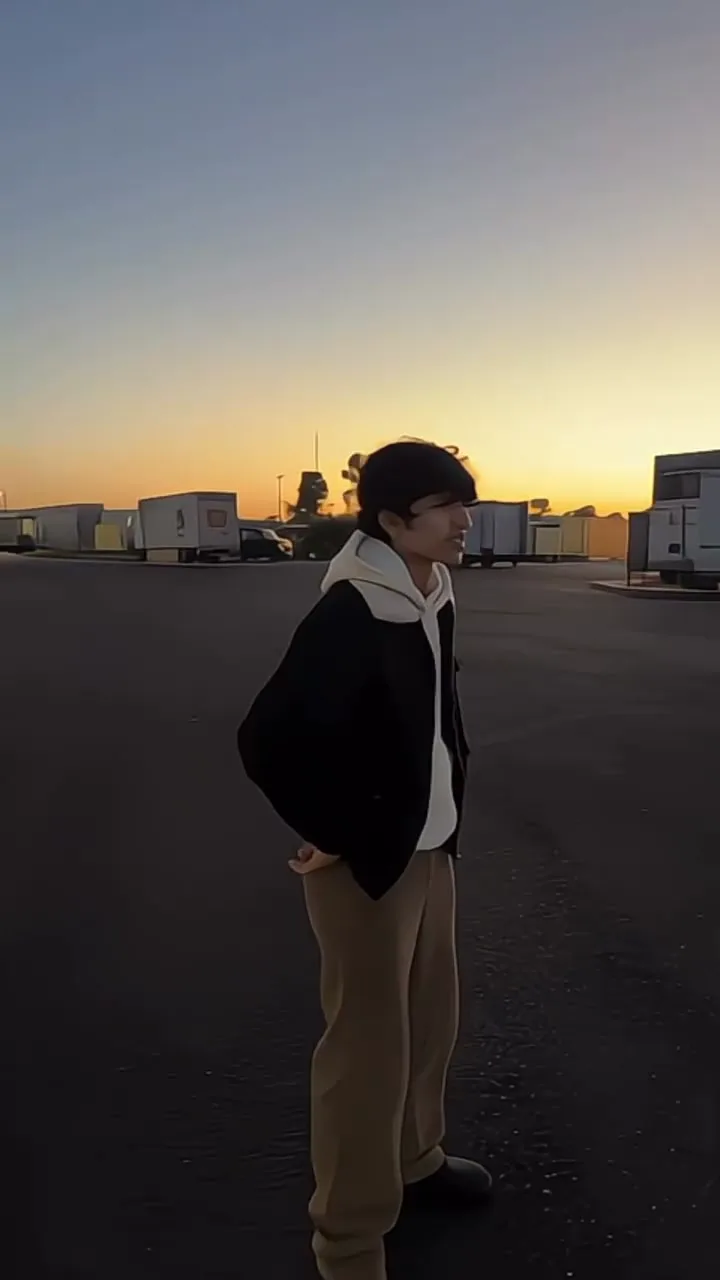
Left is the photo exactly as it went in: a young man standing still on a lot at sunset. Right is the dance photo dance AI made from it, same jacket, same sky, same spot.
Anything with a body and a face can dance. Three photo dance AI clips their makers posted on Instagram, the kind that gets sent round more than any selfie.
Photo dance AI dances almost any photo, and these four things get you the best moves on your very first run.
Feet, knees and hands need to be in the frame to dance. A photo cut off at the waist can only sway, so pick one taken from a few steps back.
'Hip-hop, shoulder pop on the beat, spin to the camera' gets more than 'dancing'. Name the music too: a hip-hop beat, a breakbeat, a slow pop song feel.
Start the prompt with 'keep the person exactly as in the photo: same face, hair and clothes', as every photo dance AI prompt on this page does, and the dancer stays recognisable.
One person, pet or toy, with some floor around them, dances best. Crop a group photo down to the one you want on the dance floor.
From the photo on your phone to a dance you can post, in three steps, with no app to install.
A JPG or PNG of one person, pet or toy, the whole body in view if you can.
Keep the preset hip-hop line, copy one from the examples, or write your own: the style, one or two moves, the beat.
Press the button and keep the tab open. Your photo dance AI video plays right on the page with its beat, ready to save as an MP4.
Free gives you a 4-second dance with its beat, for your own posts. A plan gives you up to 15 seconds for the full routine, sharper, with commercial use.
Room for a whole routine instead of one move: the two examples we made here run 12 seconds on a plan, and plan videos start ahead of free ones.
Creator renders two dances at a time and Pro six, so you can pick the best take of the same photo.
Post the dance on a monetised channel or in an ad, and switch to Grok Imagine Video 1.5 or Veo 3.1 Fast when you want a different look.
Yes, actually free, not a trial that asks for a card at the end. Upload a photo and press the button with no account and no card. A free account keeps going with no daily cap: each dance is 4 seconds at 480p on MiniMax H3, with its beat and no watermark, for personal use.
You do not need an app. This photo dance AI runs in the browser on a phone or a laptop: upload the photo, say the dance, and the video plays on the page, ready to download.
Upload the picture above, write one line about the dance ('hip-hop, a shoulder pop on the beat, a spin to the camera'), and press the button. The picture becomes the first frame and the person in it dances, with the beat in the same video.
Yes. Give photo dance AI a photo of yourself from a few steps back, with your whole body in it. Your face, clothes and the place stay as they are in the photo; only the dancing is new.
It makes the dance you describe, not a step-for-step copy of someone else's video. Name the style and two or three moves from the trend and you get a dance in that spirit, upright and ready for TikTok.
Every photo dance AI video comes with its own beat, made for the moves, in the style you name: hip-hop, breakbeat, pop. To dance to a particular song, add it in TikTok or CapCut when you post; the moves are already on the beat.
Yes, photo dance AI works on pets. Use a clear photo of the pet with its whole body in view and write something like 'stands on its back legs and dances side to side'. The cat in a bucket hat above started the same way.
Photo dance AI here dances one photo with one dancer in it. For a group of friends, make a dance from each person's photo and put the clips side by side when you post.
No. Free and paid photo dance AI videos both download with no watermark, so there is nothing to remove before you post.
No, because there is no one else's video. The dance comes from the line you write and the face comes from your photo, so the dancer looks like you from the first step to the last, and you are not reusing anybody's footage.
Photo dance AI is built not to. Your photo is the first frame and the prompt asks to keep the face, hair and clothes from the first step to the last. A sharp photo with the face toward the camera holds best, and a free dance is 4 seconds, short enough to stay the same person throughout.
A free dance is 4 seconds at 480p, long enough for one move and a spin. On a plan, MiniMax H3 makes up to 15 seconds at 768p from the same photo, enough for a whole routine.
Pick the photo nobody would expect to dance, the serious one, the cat, the toy on the shelf, and watch it move to a beat. No account needed to start, and a free account keeps the dances coming with no daily cap.
Free · 480p · with sound