
Early Black Friday: 50% off every plan

Your photo is the first frame · A voice and lips that match · No watermark

Free Talking Photo AI: Your Photo Says Your Words

Free talking photo AI for the photo you wish could say something: type the line, and the person, pet or drawing in it looks at you and says it out loud, lips and voice together.

Your words, not a scriptYou pick the voiceNo audio file needed
Who can talk

Talking Photo AI Examples: a Birthday Wish, a Cat, a Thank-You

Each of these started as one still photo and one line in quotes. Turn the sound on: every talking photo below says its own line in its own voice, the clearest proof of how real one still photo can sound.

01 / 03
Portrait

A birthday wish, said to her face

Who can talk

3

What Free Talking Photo AI Does With One Photo

Talking photo AI turns one photo into a short video that opens on that exact photo and then speaks. Upload a JPG or PNG, write the words in quotes and how they should sound, and a free run gives you a 4-second talking photo with its voice and no watermark. It runs on the same engine as our free image to video AI: start with no account, keep going on a free account with no daily cap.

What it does

A free talking photo is 4 seconds, which fits a line of about ten words: a greeting, a punchline, one sentence from the heart. On a plan the same photo can talk for up to 15 seconds.

Creative engine

One photo and one line in, one talking video out

Every free talking photo is made by MiniMax H3, the model that writes the voice and the lip movement together with the picture, so the mouth lands on the words instead of being pasted on afterwards. That is the most natural way to make a picture talk.

1 photo
What you upload
Your line
What it says
Voice + lips
In the same file

It is still your photo

Your photo is the first frame, so the face, the hair, the clothes and the background are the ones you uploaded. What changes is the mouth, the eyes and a small turn of the head while the line is spoken.

Make the next one on a free account

Sign in free and make the next talking photo, and the one after it, with no daily cap. Each video lands in your history, ready to send again.

Writing the line

How to Write What Your Talking Photo Says

The words, the voice and the face all come from one prompt. These five habits are what make talking photo AI sound like someone, not like a robot reading a card.

  1. 01

    Put the exact words in quotes

    Write who speaks, then the line in quotes: she looks into the camera and says, "Happy birthday, I wish I was there." Anything outside the quotes is direction, not dialogue.

  2. 02

    Describe the voice

    Name how it should sound: warm and slow, deep and serious, bright and fast, a soft Southern accent. For a pet, a voice that is wrong on purpose is often the funniest version.

  3. 03

    Add one feeling and one gesture

    A smile at the end, a slow blink, a raised eyebrow, a little nod. One small gesture makes a talking photo read as a person thinking, not a mouth moving.

  4. 04

    Fit the line to the length

    About ten words fit a free 4-second video. A longer message fits in a plan's 15 seconds, or split it across two talking photos.

  5. 05

    Say what we hear around them

    A quiet room, birds outside, a party in the next room. Ask for no music so the voice stays clear, and no subtitles so no text is written on the video.

Photo, then talking

Make a Picture Talk: the Photo, Then the Video

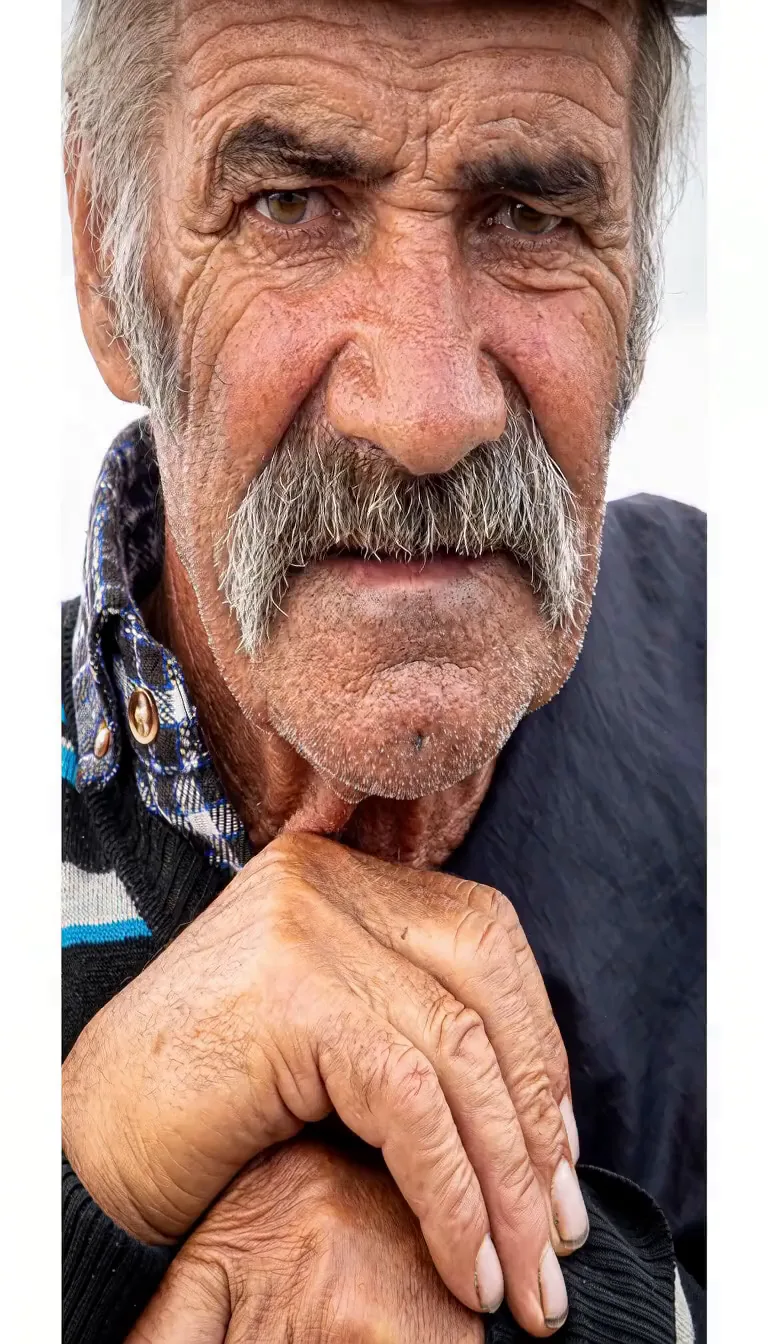
Left is the photo exactly as it was uploaded. Right is what talking photo AI made from it, with the line it was given. Turn the sound on and compare the face: it is the same face, now saying something.

The photo: an old man, hands folded
The photo
The talking photo
What people make

What People Make a Talking Photo Say

Most videos from talking photo AI are made to be sent: to the person in the photo, to the family chat, to a feed. Two more, each from one photo and one line. For a photo that should only move, with no words, animate photo AI is the page for that.

  • A selfie that tells everyone you landed

    One front-camera selfie, and the update the group chat was waiting for: "Okay, quick update: I made it! The flight was so long, but I'm here, and I already miss you guys." A laugh and a shrug, in her own voice.

  • A good-morning from bed

    A selfie taken in plaid pyjamas becomes a morning hello: she talks about sleeping in, coffee and a walk, then waves goodbye, the kind of talking photo you send instead of a text.

Steps

How to Make a Talking Photo in Three Steps

No app, no voice recording and no editor: one photo, one line and a button. Talking photo AI is the shortest path from a still photo to a talking one.

Upload one clear photo

A face looking toward the camera works best: a portrait, a selfie, your dog, a drawing of a character. One face, large in the frame.

Type the line in quotes

Who speaks, the words in quotes and how the voice sounds. Or press Give me an idea for a line to start from.

Press the button and keep the tab open

Talking photo AI renders it free and plays it right on the page with its voice. Download the MP4 and send it.

Free and plans

Free Talking Photo AI, and What a Plan Adds

The voice, the lip movement and the download are all free here, with no watermark on any talking photo. That makes this the best free talking photo AI to start with; a plan adds length, sharpness and commercial use.

No account

Start with no sign-up

Upload a photo, write the line and get a 4-second talking photo with its voice and no watermark, before you make an account.

Free account

No daily cap on a free account

Make a talking photo of everyone in the family chat. Each one comes with its voice, saved to your history, for personal use.

Any plan

Longer messages, sharper faces, your own sound

A plan makes sharper talking photos up to 15 seconds long, starts each one at full speed, covers commercial use, and lets you add an MP3 or WAV as a sound guide that shapes the clip's sound.

Answers

Talking Photo AI: Questions

Yes, here it is. Upload a photo and it starts with no account and no card. A free account keeps going with no daily cap: each talking photo is 4 seconds at 480p on MiniMax H3, with its voice and no watermark, for personal use.

Upload the picture above, write who speaks and the words in quotes, then press the button and keep the tab open. The picture becomes the first frame of a free video in which that face says your words, with lips that follow them.

Yes. Press the button with no account and the talking photo plays right on the page when it is ready. To make more, sign in with a free account; there is no daily cap on it.

No. Upload the photo, type the line and download the talking photo with no account, no card and nothing to cancel later. A plan is only for longer, sharper talking photos and commercial use, so one birthday message never needs one.

Not on the free side: there you type the words, describe the voice, and the talking photo AI speaks them. On a plan, Photo to video takes an MP3 or WAV of up to 15 seconds as a sound guide that shapes the clip's sound.

Yes. Use a photo where the pet faces the camera, say it is the dog or the cat that speaks, and give it a voice: a grumpy old man, a nervous squeak, a news anchor. The mouth moves with the line and the fur and markings stay as they are in the photo.

Yes. Photograph or scan the drawing straight on and ask it to keep the lines and colours as drawn. The character speaks in the style it was drawn in, and the paper around it stays still.

Free talking photo AI makes 4 seconds, about ten words. On a plan, MiniMax H3 makes up to 15 seconds at 768p from the same photo, enough for two or three sentences.

Free talking photos are for personal use: send them, post them on your own accounts. Any paid plan covers commercial use, so the same video can go in an ad, a course or a monetised channel.

Give Your Photo a Line to Say

Pick the photo, write the words you want to hear from it, and send the talking photo to whoever needs to hear them. No account needed to start.