
You can run MiniMax H3 without a GPU of your own in two ways: rent a graphics card by the hour and run the ComfyUI workflow there, or open a hosted copy of the same model in a browser tab. The first costs you a setup session and a 37 GB download; the second is free MiniMax H3 unlimited on a free account, and the clip starts after you press one button.
- MiniMax H3 is open weights, so "free" on Reddit means your own card. Testers report about 11 minutes for a clip on a 12 GB RTX 4070 and out-of-memory errors on some 16 GB cards.
- No card? Skip the install. The free MiniMax H3 unlimited page on freeimagetovideo.ai runs H3 on our side: a 4-second clip with sound, no watermark, personal use. Signed out, it starts about 30 seconds after you press.
- Need 15 seconds or client work? Plans run H3 up to 15 seconds with commercial use; the same prompt works in both.
Figures read from Reddit threads on 2026-11-04; your card, resolution and settings will move them.
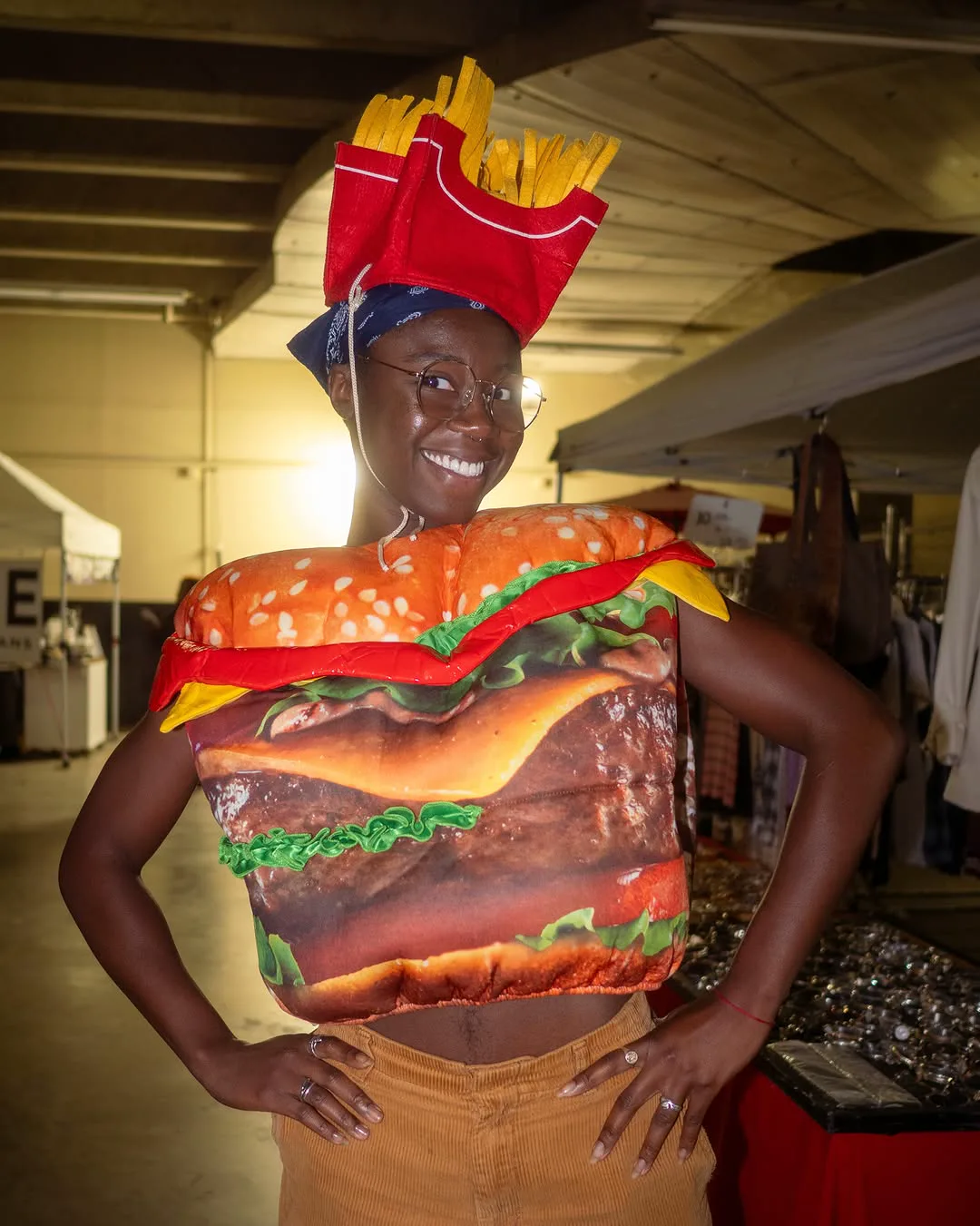
What comes out of the browser route, from a real photo: a market photo goes in, and H3 returns the woman saying her line, laughing and winking.

What does it mean to run MiniMax H3 without a GPU?
It means you do not own, or do not want to buy, the graphics card the open weights are built around. Your own card is the baseline; the other two rows are the ways around it:
| Route | You provide | You wait for | Clip you get |
|---|---|---|---|
| Your own card, ComfyUI | Usually a 12 GB or larger NVIDIA card (a 6 GB community workflow exists), 64 GB of system RAM helps | Install, ~37 GB of weights, then minutes per clip | Whatever your workflow and settings allow |
| A rented card, ComfyUI | A rental account and the same install on a fresh machine | The same install and download, billed by the hour | The same as your own card |
| A hosted copy in the browser (freeimagetovideo.ai) | A scene typed in or a photo | About 30 seconds signed out | 4 seconds with sound and no watermark on the free lane |
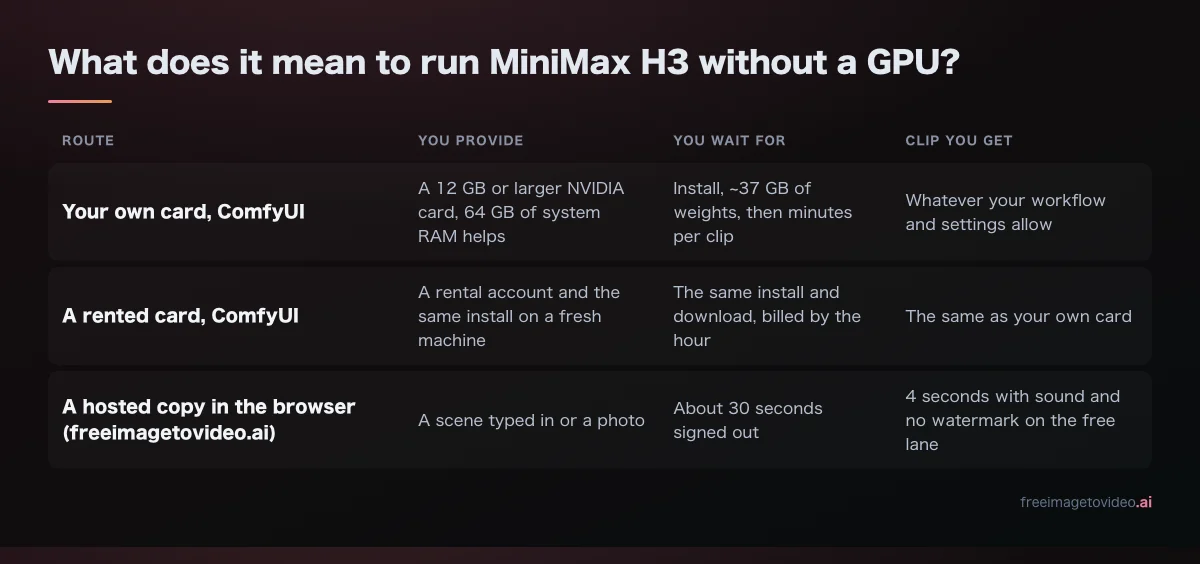
The two ComfyUI routes give you the most control; the browser route is the shortest path to a first look at what H3 does with your idea.
How to run MiniMax H3 without a GPU of your own: rent one
A rented card runs the same setup as a local one. The steps below are the ones the community workflow in r/comfyui ("30-Second MiniMax H3 Seamless Image-to-Video Workflow For 12GB GPUs", August 2026) lays out.
Step 1: Put ComfyUI on the machine
Install ComfyUI and open the H3 template workflow, or load the author's workflow JSON from CivitAI. Missing red nodes are fixed with "Install Missing Custom Nodes" in ComfyUI Manager, then a restart.
Step 2: Download the weights into the right folders
The post lists four groups of files, and a wrong folder produces a model-loading error:
models/vae/: the video VAE (fp16) and the audio VAE (fp32)models/diffusion_models/: the pruned int8 H3 modelmodels/text_encoders/: the Qwen3-VL 32B text encodermodels/loras/: the 8-step turbo LoRA
One tester measured the pruned diffusion model at 21 GB and the nvfp4 text encoder at 15.7 GB (r/StableDiffusion, 5090 test). That is about 37 GB before the first frame, and on a fresh rented machine it is a download you pay hourly for.
Check the license before you download. The official Hugging Face page says H3 is released under the MiniMax H3 Community License Agreement and points to an application form "only for USA/EU/UK/South Korea" (huggingface.co/MiniMaxAI/MiniMax-H3, read 2026-11-04). If you are in one of those places, the open weights are not a no-questions-asked download, which is one more reason to try the hosted route first.
The ComfyUI files above are community-pruned builds; the official checkpoints are a 33-billion-parameter model. A hosting company that deployed the official setup on rented cloud GPUs reported four NVIDIA H100 80 GB cards at $8.00 an hour on Spot, 196 GB of checkpoints to pull, and 51.5 minutes of generation for eleven clips, about $16 for the whole session (Hyperstack tutorial, 11 August 2026 session, updated 26 August 2026). That is the official-checkpoint end of renting; the community-pruned files above fit much smaller cards.
Step 3: Launch with the memory flags
For the 12 GB workflow the author says to start ComfyUI with --disable-smart-memory --fp8_e4m3fn-text-enc --fp8_e4m3fn-unet, and to set the resolution to 4:3 at 0.4 megapixels.
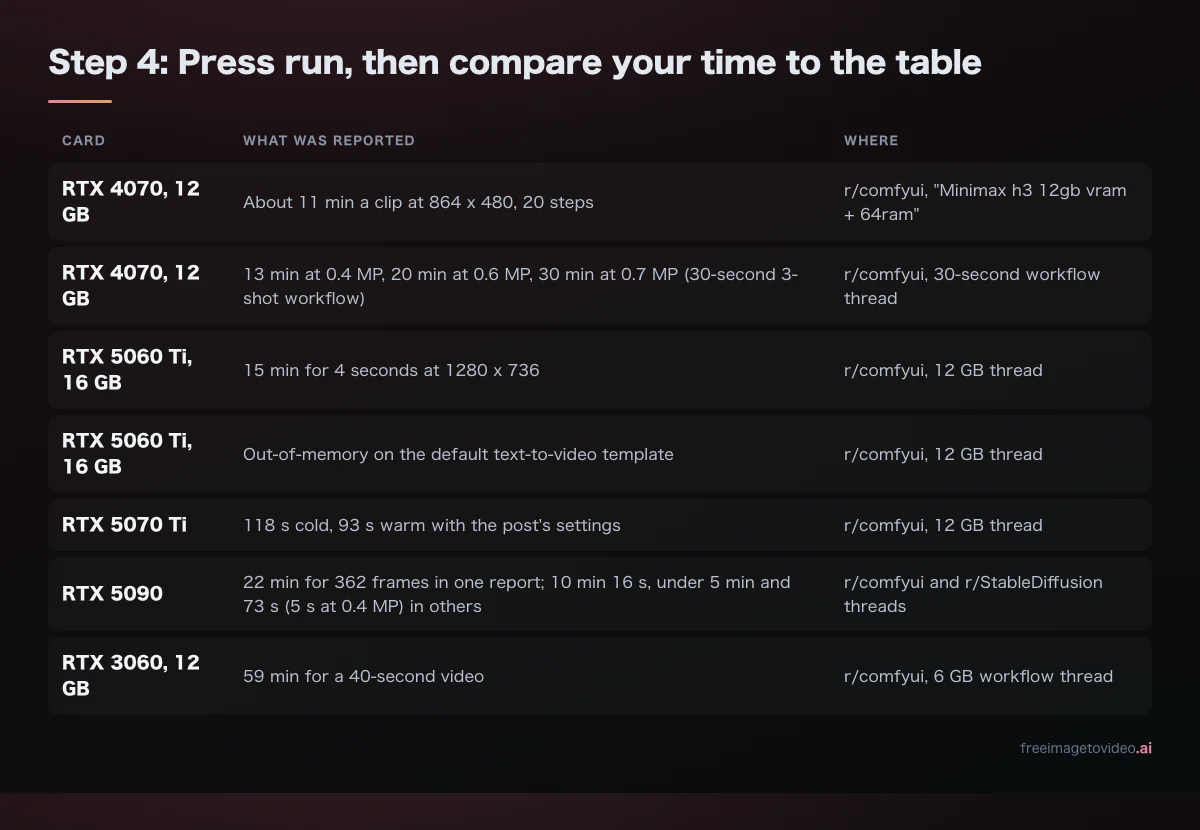
Step 4: Press run, then compare your time to the table
| Card | What was reported | Where |
|---|---|---|
| RTX 4070, 12 GB | About 11 min a clip at 864 x 480, 20 steps | r/comfyui, "Minimax h3 12gb vram + 64ram" |
| RTX 4070, 12 GB | 13 min at 0.4 MP, 20 min at 0.6 MP, 30 min at 0.7 MP (30-second 3-shot workflow) | r/comfyui, 30-second workflow thread |
| RTX 5060 Ti, 16 GB | 15 min for 4 seconds at 1280 x 736 | r/comfyui, 12 GB thread |
| RTX 5060 Ti, 16 GB | Out-of-memory on the default text-to-video template | r/comfyui, 12 GB thread |
| RTX 5070 Ti | 118 s cold, 93 s warm with the post's settings | r/comfyui, 12 GB thread |
| RTX 5090 | 22 min for 362 frames in one report; 10 min 16 s, under 5 min and 73 s (5 s at 0.4 MP) in others | r/comfyui and r/StableDiffusion threads |
| RTX 3060, 12 GB | 59 min for a 40-second video | r/comfyui, 6 GB workflow thread |
These rows mix resolutions, durations and workflows, so they are reports, not a benchmark. Read the 5090 row twice: the same card shows 22 minutes in one thread and under 5 in another. The replies blame missing speed-ups (SageAttention, the turbo LoRA, attention kernels), not the card. Settings decide the result as much as hardware does.
What goes wrong on a rented card
- Out-of-memory errors. A 16 GB card hit them on the default template, so a bigger rental is not automatically a working one.
- Clips stitched from three. The 30-second workflow builds three 10-second clips and joins them (a commenter's description of the multishot nodes), and one tester saw characters change after 15 seconds.
- The meter runs while you debug. The hourly price is for the card, not for a working workflow. A commenter on a YouTube review suggested renting an RTX 5090 for about $0.30 an hour; prices vary by provider and day, so check the rate before you count on it.
If you already own the card, one commenter says a run costs effectively $0 because the PC is paid for; another replied that the hardware was the cost.
How to run MiniMax H3 without a GPU in the browser
Open free MiniMax H3 unlimited on freeimagetovideo.ai. The model runs on our side, so there is no VRAM to count, no workflow file and no custom nodes. Your phone or a school laptop is enough.
- Type a scene or drop in a photo. The preset prompt and "Give me an idea" fill the box if you have nothing yet.
- Press the button. Signed out, the clip starts about 30 seconds later. No sign-up is needed to start.
- Play it with the sound on. The clip is MiniMax H3, 4 seconds, with its own sound, no watermark, and for personal use.
- Sign in free to keep going. A free account has no daily cap on clips. The first clip of your day starts at once; further clips the same day start about an hour after you press, and from the fifth about two hours after.
How do you write a prompt for a 4-second clip?
Reddit's H3 prompts run to whole paragraphs because local clips run 10 to 15 seconds. Four seconds holds one moment, so write one subject, one beat, one camera move and one sound. This is the page's own preset:
A street musician in a yellow raincoat plays the last chord on her guitar under a dripping awning, looks into the camera and says, "One more song?" Slow push-in at eye level, neon reflections on the wet street. Sound: rain on the awning, the guitar ringing out, her voice close and clear.
A line in quotes is how you ask for speech and a named sound is how you ask for room sound; both usually come back in the same MP4, so check the result before you share it.
Which way to run MiniMax H3 without a GPU fits you?
| You want | Use |
|---|---|
| To see what H3 does with your idea, today, with no install | The browser: free MiniMax H3 unlimited |
| Sound and a spoken line in a 4-second clip | The browser |
| 10 to 15 seconds in one clip for posting or client work | A plan: H3 up to 15 seconds, commercial use |
| A 30-second stitched sequence, or reference images fed into the workflow | ComfyUI on your own or rented card |
| Full control of steps, resolution and the workflow itself | ComfyUI |
| No monthly cost and you already own a 12 GB or larger card | ComfyUI on your own card |
The hosted page does not make the 30-second three-shot sequence or run reference-image batches; for those, use ComfyUI.
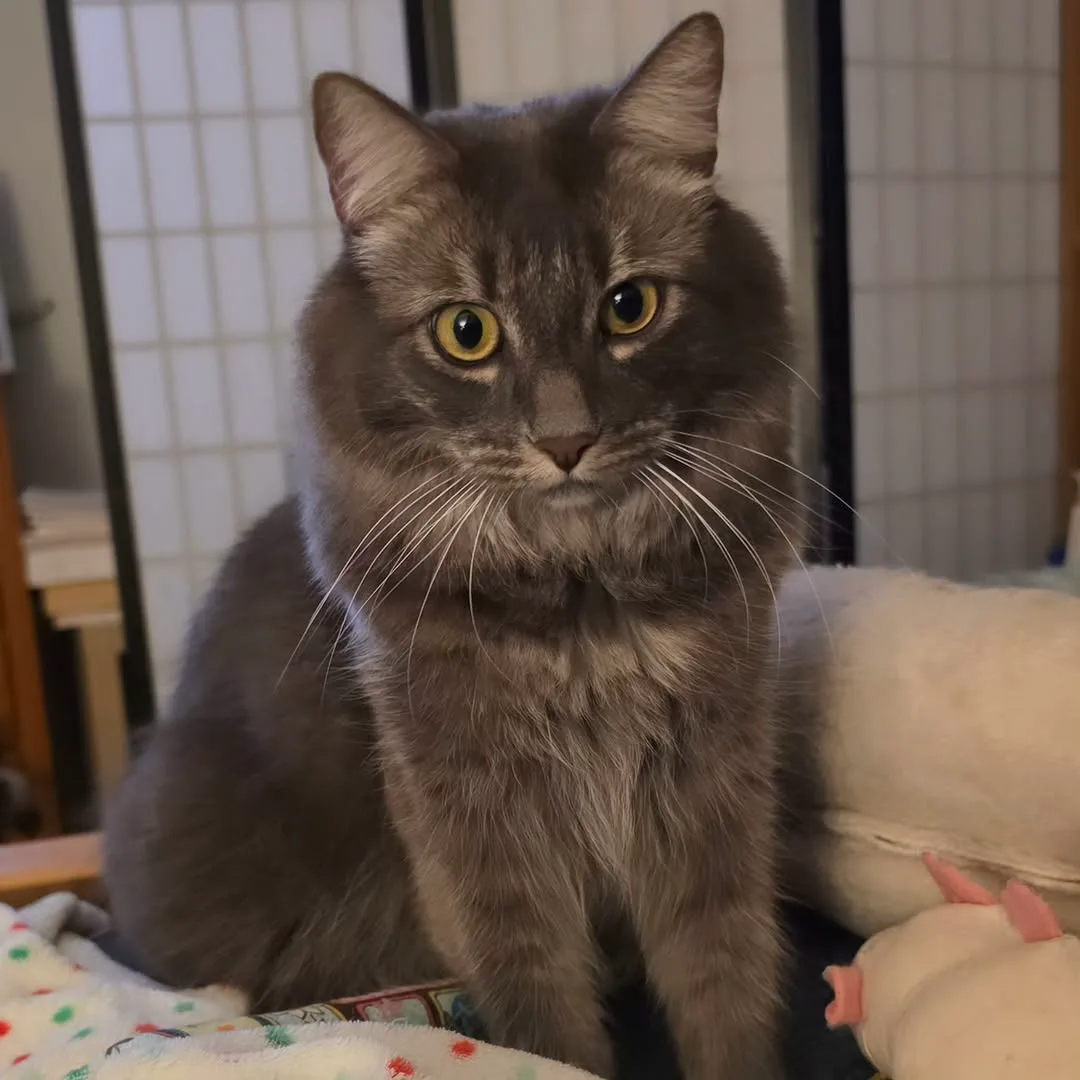
One more photo run from the browser route: a grey long-haired cat on a blanket goes in as the start image; the clip redraws it as a 2D anime cat that twitches its ears and meows.

Next steps after you run MiniMax H3 without a GPU
- Starting from a photo? Animate a photo with AI uses the same free lane.
- Starting from words only? Free text to video AI takes a scene and returns a clip.
- Feeding in reference pictures? Free reference to video AI covers that route.
- Want the sound to be the point? Image to video AI with sound is built around it.
- Just want to try it with nothing to sign up for? Free AI video generator, no sign-up starts right away.
- Ready for 15 seconds and commercial use? See the plans.
- More guides are on the blog.
- Back to the start: Free Image to Video is the home for all of it.
FAQ
Do I need a GPU to use MiniMax H3?
Not to use it. To run the open weights yourself you need a card, owned or rented. To get a clip from H3 without either, use a hosted copy such as free MiniMax H3 unlimited.
How much VRAM does MiniMax H3 need?
Testers report it running on 12 GB at roughly 11 minutes a clip, and a 6 GB workflow exists for long videos. Some 16 GB cards still ran out of memory on the default template, so the settings matter as much as the number on the box.
Can an RTX 3060 run MiniMax H3?
A tester reports 59 minutes for a 40-second video on a 3060 with 12 GB using a community low-VRAM workflow (r/comfyui). It runs; it is not quick.
Is there an official hosted way to use H3?
The Hugging Face model card lists an online API and an online app run by MiniMax. Those are MiniMax's own paid and free services, with their own terms; the browser page in this guide is separate and runs the same model on our side.
Is the browser version the same model?
Yes. The free lane is MiniMax H3, text or photo in, a 4-second clip with sound out.
Is it really free, and is there a watermark?
You can start with no sign-up. A free account has no daily cap. Clips have no watermark and are for personal use.
How long does a free MiniMax H3 clip take to start?
Signed out, it starts about 30 seconds after you press. On a free account the clip starts right away when you come in fresh for the day; after that the next ones start about an hour after you press, and from the fifth about two hours. Waiting changes when a clip starts, not what you get.
Can I use the clips commercially?
Free clips are for personal use. Ads, client work and monetized channels need a plan, which includes commercial use.
How long can a clip be?
Free clips are 4 seconds. On a plan, H3 runs up to 15 seconds.
Sources
- r/comfyui: "30-Second MiniMax H3 Seamless Image-to-Video Workflow For 12GB GPUs @ 14 Minute Render Time" (https://www.reddit.com/r/comfyui/comments/1vw036i/30second_minimax_h3_seamless_imagetovideo/), read 2026-11-04
- r/comfyui: "Minimax h3 12gb vram + 64ram" (https://www.reddit.com/r/comfyui/comments/1ve3115/minimax_h3_12gb_vram_64ram/), read 2026-11-04
- r/comfyui: "Running MiniMax H3 locally on a 5090, 362 frames in ~22 minutes, $0 API cost" (https://www.reddit.com/r/comfyui/comments/1vwxd52/running_minimax_h3_locally_on_a_5090_362_frames/), read 2026-11-04
- r/StableDiffusion: "MiniMax H3 is an amazing model." (https://www.reddit.com/r/StableDiffusion/comments/1ve4kue/minimax_h3_is_an_amazing_model/), read 2026-11-04
- Hugging Face: MiniMaxAI/MiniMax-H3 model card (https://huggingface.co/MiniMaxAI/MiniMax-H3), read 2026-11-04
- Hyperstack: "Deploy MiniMax H3 on GPU Cloud for Video and Audio in One Pass" (https://www.hyperstack.cloud/technical-resources/tutorials/deploy-minimax-h3-on-gpu-cloud-for-video-and-audio-in-one-pass), read 2026-11-04
- r/comfyui: "ComfyUI Tutorial MiniMax H3 Long Video 40 Seconds on Just 6GB VRAM" (https://www.reddit.com/r/comfyui/comments/1wo2dsg/comfyui_tutorial_minimax_h3_long_video_40_seconds/), read 2026-11-04